iPhone location changer · no jailbreak
Put your iPhone anywhere.
One tap moves your iPhone anywhere on Earth, and every app on it believes you. Find My, Life360, Snap Map, Tinder: same story. Set it up from your computer, then run it from your pocket.
- 30 minutes free daily
- No jailbreak
- iOS 17.4+
- Mac & Windows
Real recording. Apple Maps goes from Leicester to Paris the moment you tap Move here.
where are you right now?
Anywhere, in one tap.
Pick a place. Stealthy rewrites the location iOS itself reports, so the map, your friends and their trackers all agree with you.

Now boardingLeicester → Paris
- Every appSystem-level location
Stealthy changes what iOS itself reports. No per-app tricks.
- USB setupMac or Windows
Install with your computer and a cable. Free Apple accounts need a weekly refresh.
- 0 cablesSpoof from your pocket
After setup the iPhone changes location on its own, wherever you are.
- PrivatePlaces stay on your iPhone
Stealthy checks your access without receiving the places or routes you choose.
every app, same story
One location. Every app agrees.
Find My, Life360, Snap Map, Tinder and the rest all read the same new place, because Stealthy changes the one thing they all ask iOS for.















Works with Find My, Life360, Snapchat, Instagram, Tinder, Bumble, iMessage, WhatsApp, Google Maps, Apple Maps, BeReal, TikTok, Pokémon GO, Family Link, Yubo, Wink.
same iPhone, same minute
Before. After. Nothing else changed.
Two frames from the recording above: Apple Maps right before and right after Move here. Drag the handle.
- Real GPS on the left, Stealthy on the right
- Same phone, same session, one tap apart
- Restore returns your phone to its real location
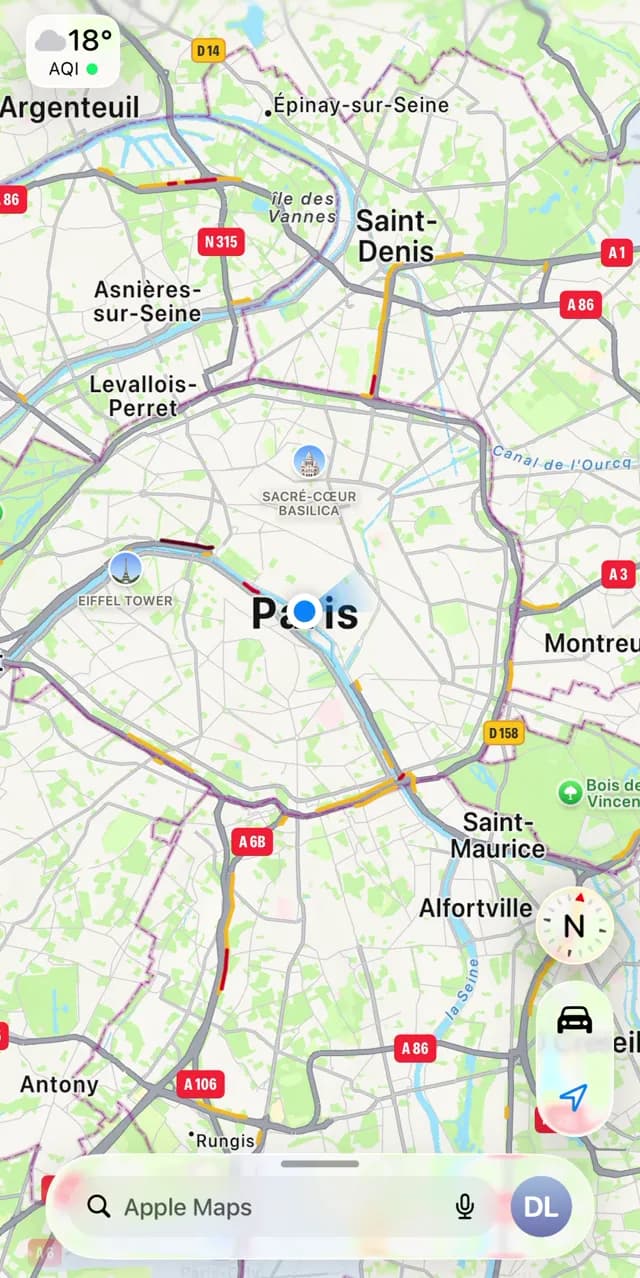
 Before · LeicesterAfter · Paris
after you get it
Set up. Unplug. Go.
Start free on your Mac or PC
Download Stealthy for your computer and sign in. You get 30 minutes of location-changing time each day without a card.
Set up your iPhone
Plug in by USB. Stealthy guides installation, Developer Mode and the LocalDevVPN connection helper.
Unplug and go
Change location from your iPhone with LocalDevVPN connected. Free Apple accounts refresh from the computer weekly. Restore whenever you like.
built for people with somewhere to be
Every trick in the book.
Teleports, real-road routes, schedules and a lock that holds after you unplug. The places you pick never leave your iPhone.
Move anywhere
Search a place or drop a pin, then tap Move here. Start with 30 free minutes daily; Pro removes the limit.
Real-road routes
Simulate a walk, a bike ride or a drive along actual roads at a believable pace, then arrive.
Holds when you unplug
Start a spoof from your computer and lock it. The location stays pinned after you walk away.
No computer in sight
After a one-time install, Stealthy runs on the iPhone itself. Change location from your pocket.
Schedules
Choose when to leave. Stealthy moves you there on its own and holds your last point.
Private places
The places and routes you choose stay on your iPhone. Stealthy checks access without receiving your coordinates.
from the DMs
Where were you last night?
Wherever you said. Stealthy is for the moments when your location is nobody’s business but yours.
My girlfriend checks Find My like it’s her job. Now it shows me at the gym while I’m out with the boys. She has never been more relaxed.
Life360 told my mom I was in the library all night. I was three hours away at a concert and home before she noticed a thing.
Our attendance app checks you’re on campus. I “attended” the 8am lecture from my bed and still got the credit.
Set it to Miami two weeks before my trip. I had dates lined up before the plane landed.
Snap Map used to give my whole life away. Now my friends think I live in Tokyo and my weekends stay private.
BeReal from the top of the Eiffel Tower. I was in my kitchen in socks. Nobody has questioned it.
rather use a computer?
Search. Set location. Done.
The desktop app works the same way over USB: pick a place, press Set location and your connected iPhone is there. Lock it and it holds after you unplug.
- Any iPhone or iPad on iOS or iPadOS 17.4 or later
- Mac and Windows, one subscription for your computer and your iPhone
- Start a spoof, lock it, walk away
your boarding pass
Start free.
Get 30 minutes of free location-changing time every day, shared across Mac, Windows and your iPhone. Upgrade inside the app for unlimited usage.
- From
- Wherever you are
- To
- Anywhere on Earth
- Departs
- Right now
- Fare
- 30 min free daily
- Gate
- Mac or Windows
- Seat
- Your iPhone
Sign in to use 30 free minutes each day. No payment method required. Your allowance resets at midnight in your account timezone. Pro subscriptions start when purchased and renew automatically unless canceled. Stop and Restore always remain available.
questions, answered
Before you go anywhere.
Do I need a computer?
Yes, a Mac or Windows PC and a USB cable for installation. Then change location from your iPhone with LocalDevVPN connected. Free Apple accounts need a signing refresh from the computer every seven days.
Does this need a jailbreak?
No. Stealthy never jailbreaks or modifies iOS. Your iPhone stays completely stock. It sets a location through the developer pathway Apple already ships, and it is fully reversible.
Will it work with all apps?
Yes. It works at the system level, so every app on your phone reads the same new location: Find My, Life360, Snapchat, Tinder, Google Maps and the rest.
Do I need a credit card to start free?
No. Sign in for 30 free minutes of location-changing usage per day, shared across your devices. Pro is optional and requires payment; its price and recurring terms are shown in the app before purchase.
Do I have to keep my phone plugged in?
Not after setup. Stealthy runs on the iPhone itself. From a computer you can also start a spoof and lock it, so it holds after you unplug and walk away.
Does my location go back to normal when I stop?
Tap Restore to return to your real location. It remains available without a subscription. Stealthy confirms when restoration finishes; if the connection is interrupted, reconnect and retry.
Will it change anything on my phone?
Setup adds Stealthy and the LocalDevVPN connection helper, and guides you through Apple’s Developer Mode toggle. No jailbreak is needed. You can delete the apps like other iPhone apps.
Is this safe for my iPhone?
Stealthy uses Apple’s developer location pathway without jailbreaking iOS. Developer Mode is required; setup explains the setting before you turn it on. Restore returns your phone to its real location.
Can my Apple ID or accounts get banned?
Your Apple Account is used to sign the iPhone app during installation. Some apps and games detect simulated location and may restrict or penalize accounts, so check the rules of the apps you use.
Does it work on Windows too?
Yes. Stealthy runs on Mac and Windows, and the iPhone app installs from either one. One subscription covers your computer and your iPhone.
Does the app stop working after a while?
Apple signs an app installed this way for a limited window: seven days on a free Apple Account, longer with a paid developer account. Before it expires, plug in and choose Install / refresh in Stealthy on your computer. Your subscription is separate and stays unchanged.
Why does it ask for my Apple ID?
Only during installation, to sign the app for your device. It goes from your computer straight to Apple and is never sent to Stealthy.
Which devices are supported?
iPhone or iPad running iOS or iPadOS 17.4 or later, with a Mac or a 64-bit Windows 10 or 11 PC for installation and signing refresh.

Leave without leaving.
Install from your computer. Change location from your iPhone.
Start free